

SmartBOL Shipping Documentation Signing & Retention Solutions

Automates warehouse processes, improves efficiencies while eliminating errors and reducing costs.

Document Signing and Retention

Reuse shipment information from ERP/WMS to create, sign, digitize and retain shipping documents on tablets for on-demand retrieval.

  • Shipping Documentation

  • Supports VICS/Master BOL

  • Sign Docs on tablets

  • Capture Shipment Photos

Features

Shipping Documentation and Signing

Shipping Documentation
Create VICS/Master BOL or Pack Lists from ERP/WMS records.

Sign Documents Electronically
Search and access signed documents from cloud based repository.

Shipment Photo Capture
Capture and store shipment photos directly from a tablet.

Proof of Delivery
Simple proof of delivery for mobile devices.

Automated Document Distribution
Distribute documents automatically by SMS, email or webhooks.

Document Verification
Allows the receiver to verify the received documentation.

Document Access Portal
Cloud based document portal for on-demand access.

Benefits That Drive Measurable Results

Designed to reduce costs, automate processes, improve efficiency, and expedite warehouse operations.

Eliminate Driver Detention

Reduce detention costs and issues by reducing driver processing time and logging.

Reduce Operating Costs

Saves on labor and printing costs while eliminating manual processes and errors.

Reduce DSO

Automated ship confirm reduces the number of days to invoice (WIP turnover) and DSO.

Eliminate Fraud

Verify documents to eliminate document tampering and fraud during transport.

Improve Customer Service

On-demand document access for customer service, billing, chargebacks, claims and audits.

Reduce Carbon Footprint

Significantly reduces carbon foorprint helping the company wide sustainability initiative.
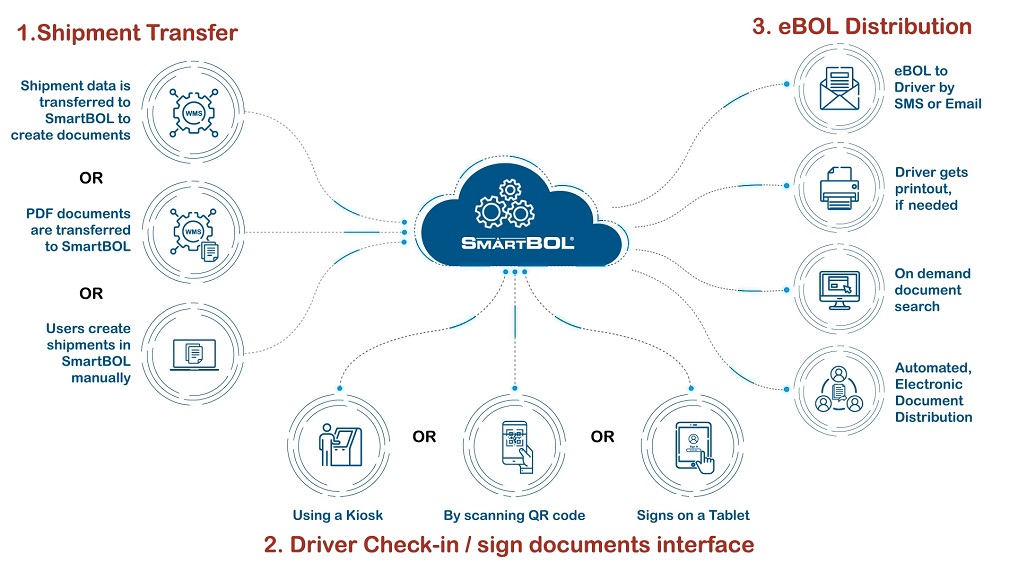
SmartBOL Workflow

Here's the SmartBOL workflow: Step 1 — Shipment Transfer. A shipment enters SmartBOL in one of three ways: shipment data is transferred in from a WMS so SmartBOL can create the documents; or finished PDF documents are transferred into SmartBOL directly; or a user creates the shipment manually inside SmartBOL. All three routes converge in the SmartBOL cloud. Step 2 — Driver Check-in / Sign Documents. When the driver arrives, they check in and sign the documents through whichever interface fits the site: at a kiosk, by scanning a QR code on their own device, or by signing on a tablet. Step 3 — eBOL Distribution. Once signed, the electronic BOL is distributed automatically. The driver receives the eBOL by SMS or email, can get a physical printout if one is needed, and the documents become available for on-demand search — all handled through automated electronic document distribution.

Visit SmartBOL Booth 236356 at IMTS 2026